Friday, December 24, 2010

MENAMBAHKAH COOKIES DI BROWSER TANPA ADD ON

cara menambahkan cookies ke browser tanpa addons. untuk mempermudah agan aja.
bisa dipake di FF & semua Mozilla browser, Google Chrome, Opera. (mungkin yang lain bisa juga, coba aja)
silakan klik disini untuk tutornya
Untuk update cookies code dimari ato disini ( yang msh anget scrool di page terakhir )

Dengan cookies ini kita bebas download spuasnya di web file sharing semisal Hotfile, Rapidshare, megaupload, depositfile, dsb karena kita akan mendapatkan akun premium GRATIS cuma dengan trik memakai cookies ini.
NB : Harap jgn di log out ya gan, ditutup aja tabnya g apa2...thanks

Tuesday, November 2, 2010

Device Doctor

Update Your Hardware Drivers For Free With Device Doctor

When you reformat your computer system, you need to reinstall your drivers but sometimes you cannot find the proper driver and then sadly you will not be able to get your hardware to function. What do you do? Well Device Doctor can also identify and download the proper driver for unidentified items.

Let’s take a look at the application, how it works and how it can help you update drivers for free.

Firstly connet internet and run the program it will do its thing:

and Click begin scan so let it scan your pc driver


Once the scan is completed you will be presented with a full list of devices that need updating. But wait! There is more - the application actually provides download links to grab the drivers that need updating. They really take all the leg work out of this for you.

If a device is unidentified the application can still grab data from the card and check for drivers online. This is super helpful when you do not know where to look for the correct drivers. This can help you to not have to open the case and pop the card out looking for the fcc id or another identifying piece of information.

When you click download update it will take you to a webpage. That page will contain information as well as the link to grab the driver.

Finally, when you don’t know what drivers you need, this can wind up being a MUST HAVE application!

Download Device Doctor

I'll post for offline guide as soon as posible...

Sunday, October 31, 2010

Tips Gagal Instal Office2007

Bagi yang error install office 2007 dan muncul tulisan :
"The windows installer service cannot update one or more protected windows files",
Pemecahannya :
1. Siapkan CD Installer Windows XP
2. Cari file bernama FP40EXT.CAB biasanya di folder \i386
3. Extrak file tersebut ke c:\program files\common files\microsoft shared\web server extensions\40\bin
4. Coba install Office 2007 nya
Atau bagi yang tidak ingin mau ribet silakan download file di akhir tulisan ini kemudian langsung ikuti langkah ke 3.

Download FP40EXT.CAB

Kalau masih gagal coba ini gan :

Change the memory settings for installation

To change the memory settings for installation, follow these steps:
  1. Click Start, and then click Run.
  2. In the Open box, type msconfig, and then click OK.
  3. On the BOOT.INI tab, click Advanced Options.
  4. In the BOOT.INI Advanced Options dialog box, select the /MAXMEM= check box, and then change the setting to 256 (or lower if your computer has less RAM).
  5. Click OK to close the BOOT.INI Advanced Options dialog box.
  6. In the System Configuration Utility dialog box, click Apply.
  7. Click OK to close the System Configuration Utility dialog box.
  8. Click Restart to the following message:
    You must restart your computer for some of the changes made by System Configuration to take effect.
  9. After you restart your computer, install Office as a Complete Install.
  10. After you install Microsoft Office, follow steps 1 through 8 to clear the /MAXMEM= check box.
Good Luck...semoga berhasil...
sumber : mikocok

Tuesday, October 26, 2010

Membuat Ghost Dari USBFD

Persiapan :

1. Flashdisk ukuran terserah (min. 64 MB)

2. Software Ghost

3. Softwre Usb Format

Mulai :

1. Buat Folder D:/ghost

2. Ekstrak File/Software Ghost yang tadi di download ke dalam Folder D:/ghost

3. Pasang Flas Disk yang akan di buat “FD Hiren”

2. Format Flas Disknya dengan menggunakan “USB Format” yang di download tadi

caranya :

  • Jalankan Program HPUSB Disk Storage (USB Format yang tadi di download)
  • Pilih Device (Flash disk anda)
  • File Sistem : FAT 32
  • Volume Label : Terserah aja (biasanya muncul sesuai nama dari flash disknya)
  • Centang Quick Format
  • Centang Create Dos
  • pilih “using DOS sistem files located at”
  • lalu browse/cari folder “ghost” (yang di buat tadi D:/ghost)
  • START

4. Setelah selesai memformat Flash Disk nya Copy semua file yang ada di folder “D:/ghost” ke dalam flash disk

bila ada keterangan muncul “Confirm file replace” Klik NO

Download Software Ghost

Download Software USB Format

Thursday, October 7, 2010

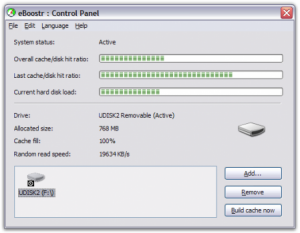
Mengubah Flashdrive Menjadi RAM


Program eBoostr ini sebenarnya tidak gratis atau dapat kitak katakan berbayar, namun sudah banyak juga cracknya atau patchnya yang bisa digunakan untuk menghilangkan batasan dalam free trial.
Konsep dasar eBoostr ini adalah membuat cache ke dalam flash drive yang tentunya kecepatan akses data untuk read/write lebih cepat dibanding dengan proses melalui hard disk.
Ada beberapa syarat yang harus dipenuhi untuk mendapatkan hasil maksimal :
1. Flash Disk dengan kecepatan Read/Write minimal 20 MB/s, lebih cepat lebih baik tidak perlu space yang terlalu besar juga minimal 512-1GB saja sudah cukup. Atau jika kesulitan menemukan flash drive yang kecepatan read/writenya bagus dapat cari flash dengan logo “ReadyBoost”.
2. Port USB 2.0
3. eBoostr program.
Cara instalasinya cukup mudah. Untuk step-by-step nya instalasi dan patch nya sebagai berikut :
1. Download dan exctrac file eBoostr.2.02.Build.424
2. Jalankan dan install eboostr.exe
3. Setelah instalasi selesai.... jangan jalankan eboostr, kalau eboostr sudah jalan secara otomatis... tutup eboostr dengan cara klik kiri eboostr yg berada di system tray (kanan bawak dekstop) lalu pilih exit
4.Setelah ditutup, jalankan patch.exe
5.Saat patch.exe di buka, pilih patch dan cari di mana program eboostr di install.
6.Setelah “done”, eboostr akan menjadi full
7.Untuk membuat flashdisk menjadi memory RAM tancapkan flashdisk ke komputer
8.Lalu jalankan eboostr dan pilih add
9.Pilih flashdisk yang akan di jadikan memory RAM
10.Tentukan ukuran cache, sebaiknya jangan di ubah (buat sesuai default) karena eboostr akan menentukan jumlah cache yg akan dijadikan RAM.
11.Setelah itu pilih "ok" dan tunggu beberapa saat. Proses akan berlangsung cukup lama tergantung berapa besar cache yg digunakan.
12.Setelah selesai akan ada pertanyaan, lalu pilih ok.
13.Setelah proses selesai komputer anda akan menjadi lebih cepat

Silakan Download EboosterV3.0 build491 + Jamu

Ebooster V3.o build 491 sudah support di Vista/7

INFO(JobVacancy,Bisnis,shopping etc)

Nokia Master Code

This mastercode will not work with phones 1100, 1110, 1600, 2100, 2300, 2600, 2650, also not for BB5 phones! If you are never changed your security code, try the Nokia default code: 12345!
Wahana Ponsel FREE
Nokia Master Code
IMEI:

Believe it or Not...